Sylva adapts the way it talks to you based on your preferences — choose a communication style that fits how you think, and Sylva remembers it as part of its evolving understanding of you.
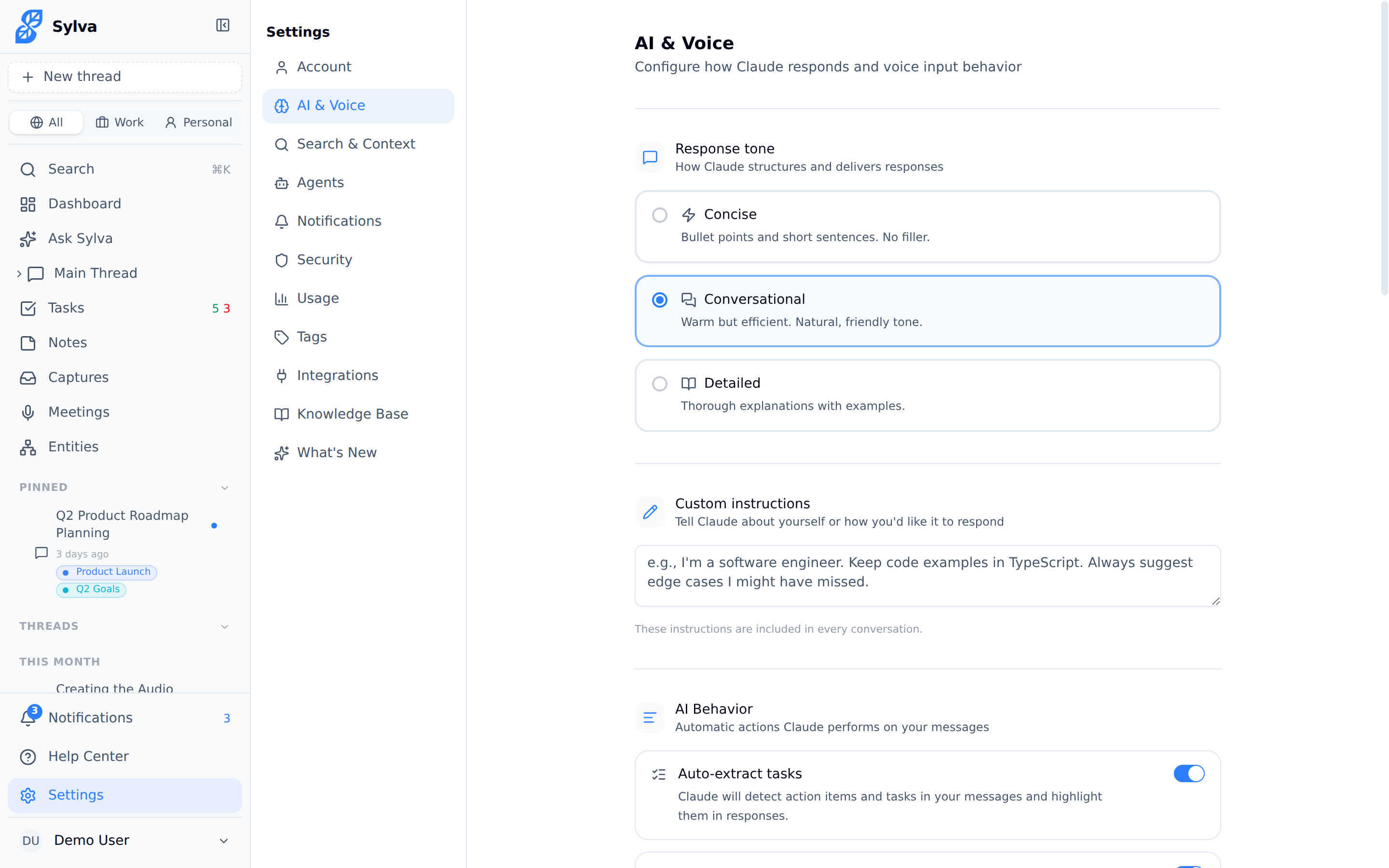
Setting Your Tone Preference
Your tone preference controls how Sylva structures its responses across every conversation. Go to Settings > AI & Voice and choose one of three styles:
- Concise — Short, direct answers. Minimal explanation. Best if you want fast answers and already have context
- Conversational — A natural back-and-forth feel. Sylva explains its reasoning but doesn't over-elaborate. This is the default
- Detailed — Thorough responses with full context, examples, and nuance. Best for complex topics or when you're thinking through a decision
Pick the one that matches how you prefer to receive information. You can change it anytime — there's no penalty for switching.
How Your Settings Feed the Soul System
Every time you save a change on the AI & Voice page, Sylva automatically logs that preference as a soul observation — a piece of knowledge Sylva keeps about you to personalize future interactions.
This happens behind the scenes. You don't need to do anything extra. For example, if you switch your tone from Conversational to Concise, Sylva records that you prefer brevity. Over time, these observations compound — Sylva doesn't just follow a setting, it builds a deeper model of how you like to communicate.
Soul observations created from settings changes work the same way as observations extracted from your conversations: they have a confidence score, they can decay if contradicted by newer behavior, and they're deduplicated so you won't end up with redundant entries.

Other Voice-Related Settings
The AI & Voice page includes additional preferences that also feed into the soul system:
- Communication context — Whether Sylva defaults to a work or personal lens when interpreting your requests. This shapes how Sylva frames suggestions and prioritizes information
- Verbosity for follow-ups — Controls whether Sylva proactively offers next steps and related suggestions, or waits for you to ask
- Language and phrasing style — If you prefer formal language, casual phrasing, or industry-specific terminology, Sylva picks up on these preferences both from this setting and from how you naturally write in conversations
Each of these settings is logged as a soul observation when changed, so Sylva's understanding of your preferences stays current even if you adjust things months apart.
What Happens Behind the Scenes
Sylva's soul system learns about you from two sources:
- Explicit settings — The preferences you set on the AI & Voice page (documented here). These are recorded as high-confidence observations the moment you save
- Conversation extraction — As you chat with Sylva, it periodically analyzes your messages to pick up on communication patterns, priorities, and preferences you haven't explicitly configured
The two sources reinforce each other. If you set your tone to Concise and your messages are consistently short and direct, Sylva's confidence in that preference strengthens. If your behavior drifts — say you start asking for more detailed explanations — Sylva notices the shift and adapts, even before you update the setting.
You can review what Sylva has learned about you at any time through the soul observations panel. Nothing is hidden, and you can edit or remove any observation.